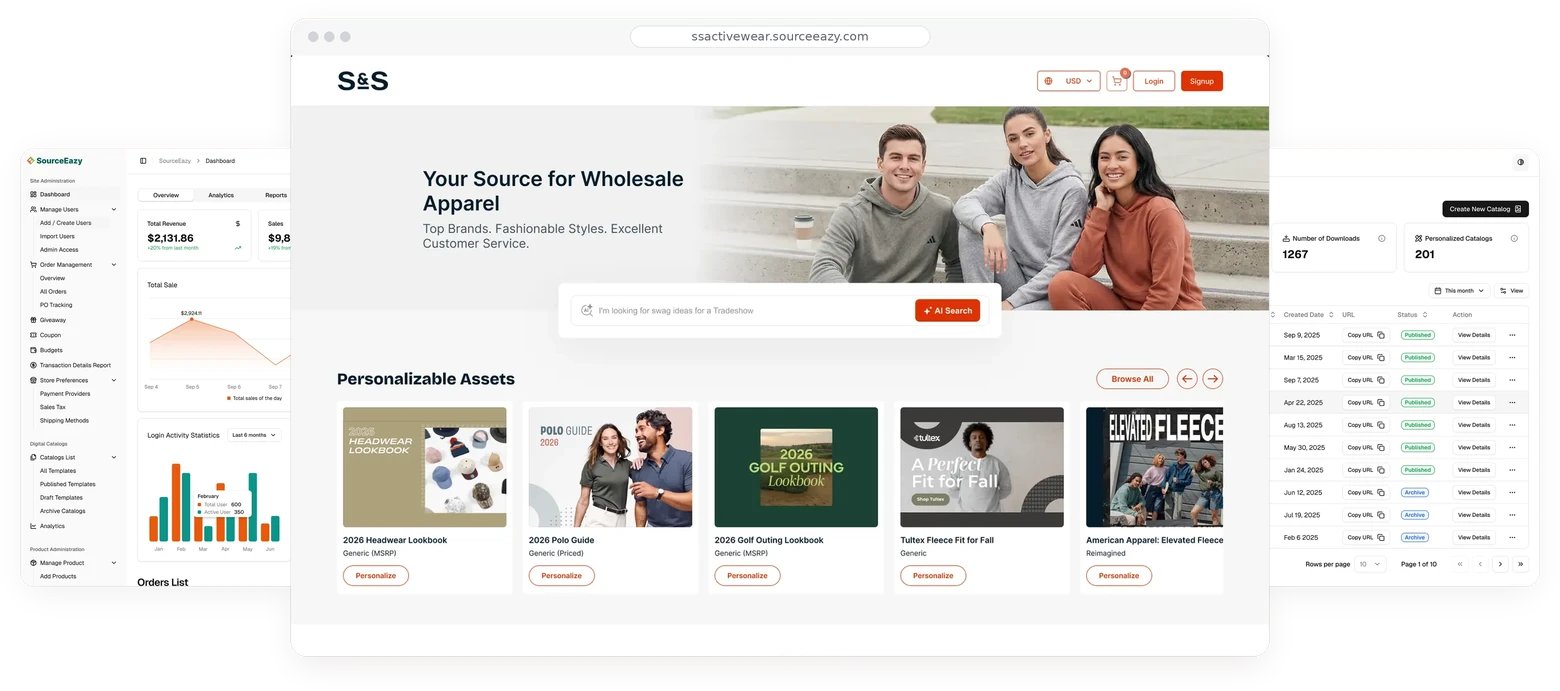
The SourceEazy website sells four products: Design Studio, ProofEazy, Digital Catalogs and MerchStore. I designed the admin dashboard where customers run all of them, from products and pricing to orders, catalogs, rewards and billing.
Role
Senior Product Designer
Company
SourceEazy
Period
2025 to now
Platform
Web app
01.Overview
Everything the website promiseshas to be run from here
Distributors, suppliers and brands sign up on the website for very different products. After sign-up they all land in the same place: this dashboard. It has to feel simple for a creator with four products, and hold up for a distributor running hundreds of orders, catalogs and stores.
I owned the dashboard end to end: information architecture, a reusable page system, and every module from orders to subscriptions.
Design StudioDistributors, decorators, dealers
ProofEazySuppliers
Digital CatalogsCatalog automation
MerchStoreCreators and businesses
SourceEazy DashboardOne login, one sidebar
Products & decoration
Orders & proofs
Digital catalogs
Users & imports
Giveaways, coupons, rewards
Store, billing & settings
35Pages in the sidebar
5Navigation groups
4Products run from one place
1Shared page system
02.Information architecture
Grouped by job,not by product
Customers don’t think “I’m in ProofEazy now”; they think “I need to fix an order” or “I need a new catalog”. So the sidebar is organised by the work: Site Administration, Digital Catalogs, Product Administration, Account Management and Content Administration. Select a page to see it.
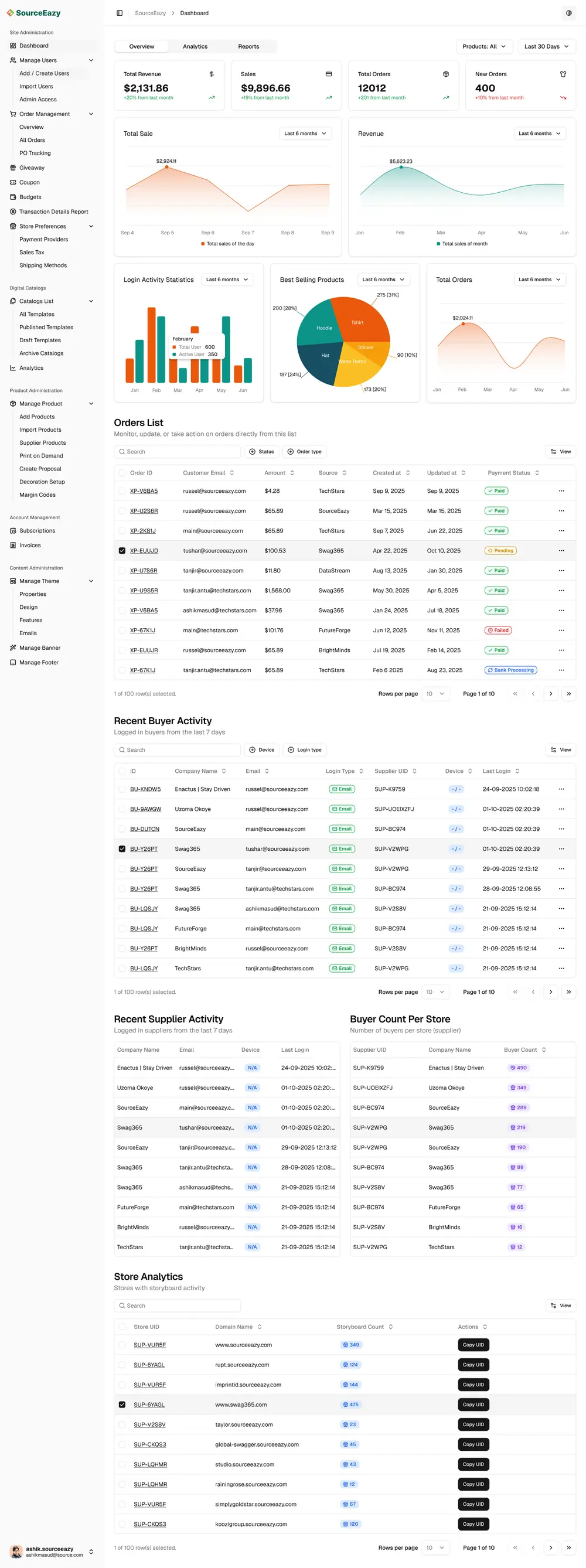
Dashboard. Four headline numbers, five charts and five live tables: orders, buyer and supplier activity, buyers per store and store analytics.
Manage Users. 13,356 users at a glance, with roles (Superadmin, Admin, Manager, Users) and statuses (Active, Invited, Suspended).
Import Users. Every Excel, Google Sheets or CSV import, with who uploaded it, when, and whether it worked.
Order Management. Totals, this week and this month, order and sales trends, best sellers, then the full order list.
Giveaway. 650 giveaways, 450 giveaway orders and 1,868 units, each with a shareable URL.
Coupon. Create, update and retire coupons; 2 active and 123 expired of 125.
Budgets / Rewards. Rewards for everyone, a team or one person, with value, issue and expiry dates.
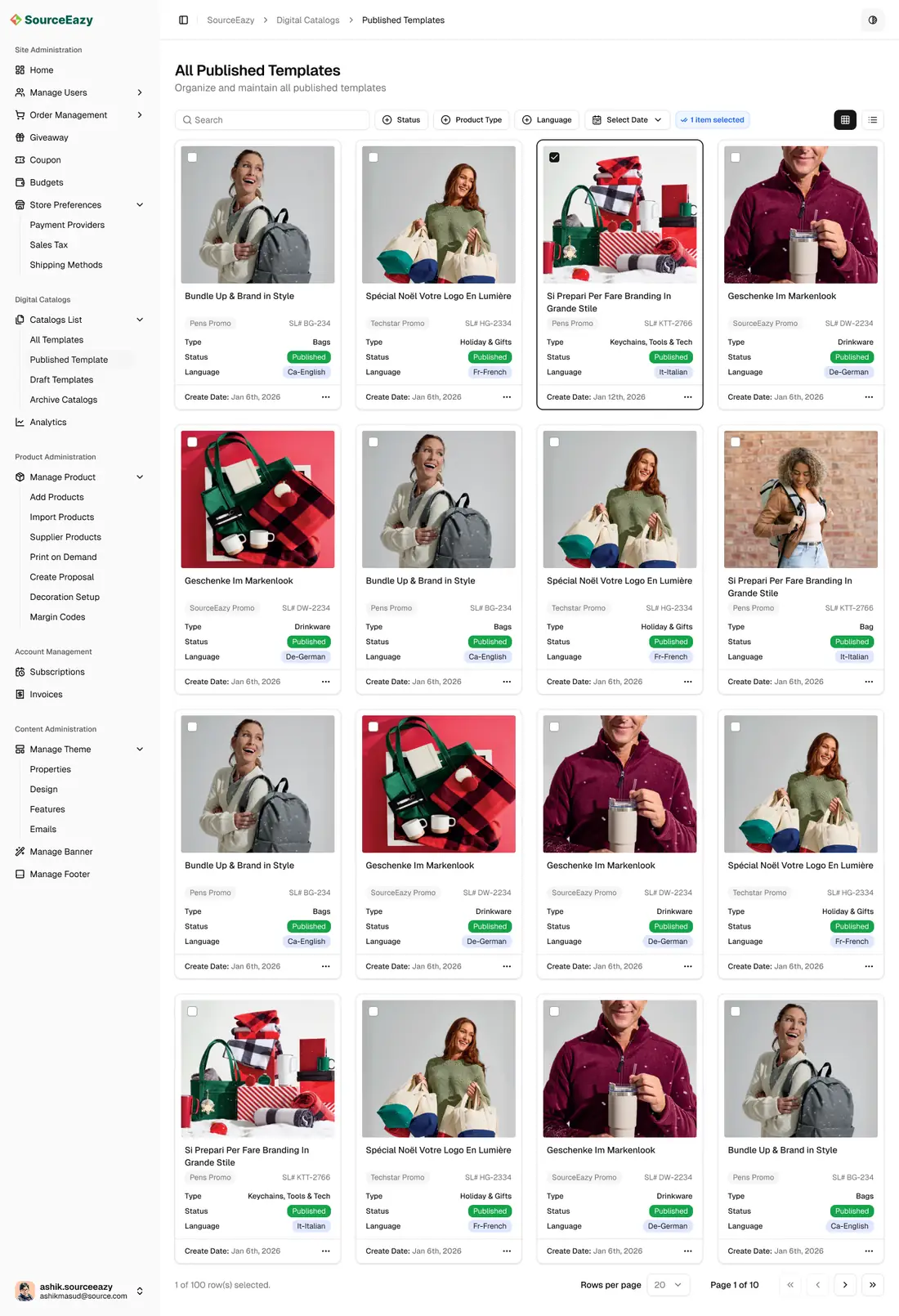
Published Templates. Every published catalog as a card: client, type, status, language and date.
Analytics. Opens, clicks, downloads, comments, links and shares for each catalog.
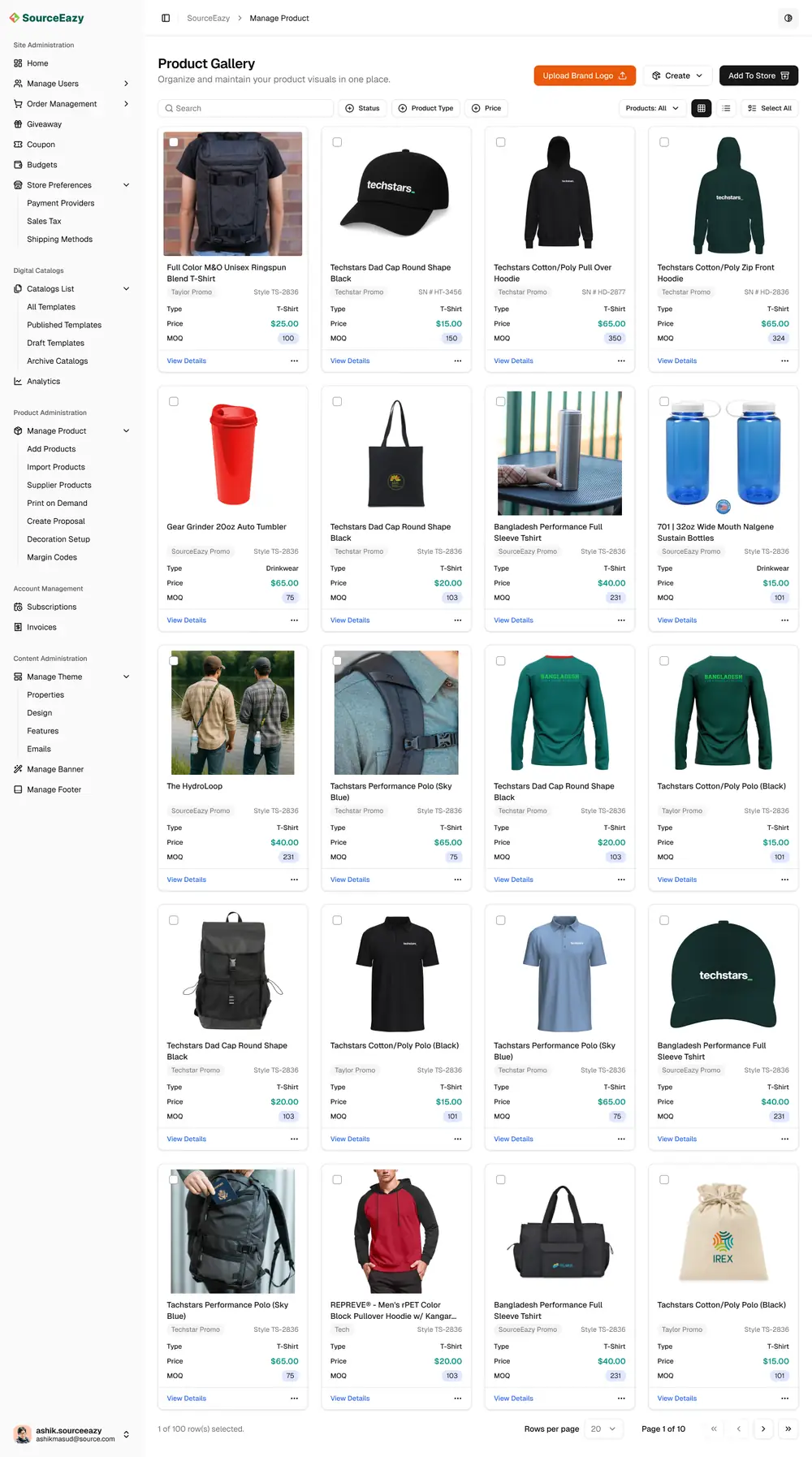
Manage Product. The product gallery: price, MOQ and type for every product, with brand-logo upload and Add To Store.
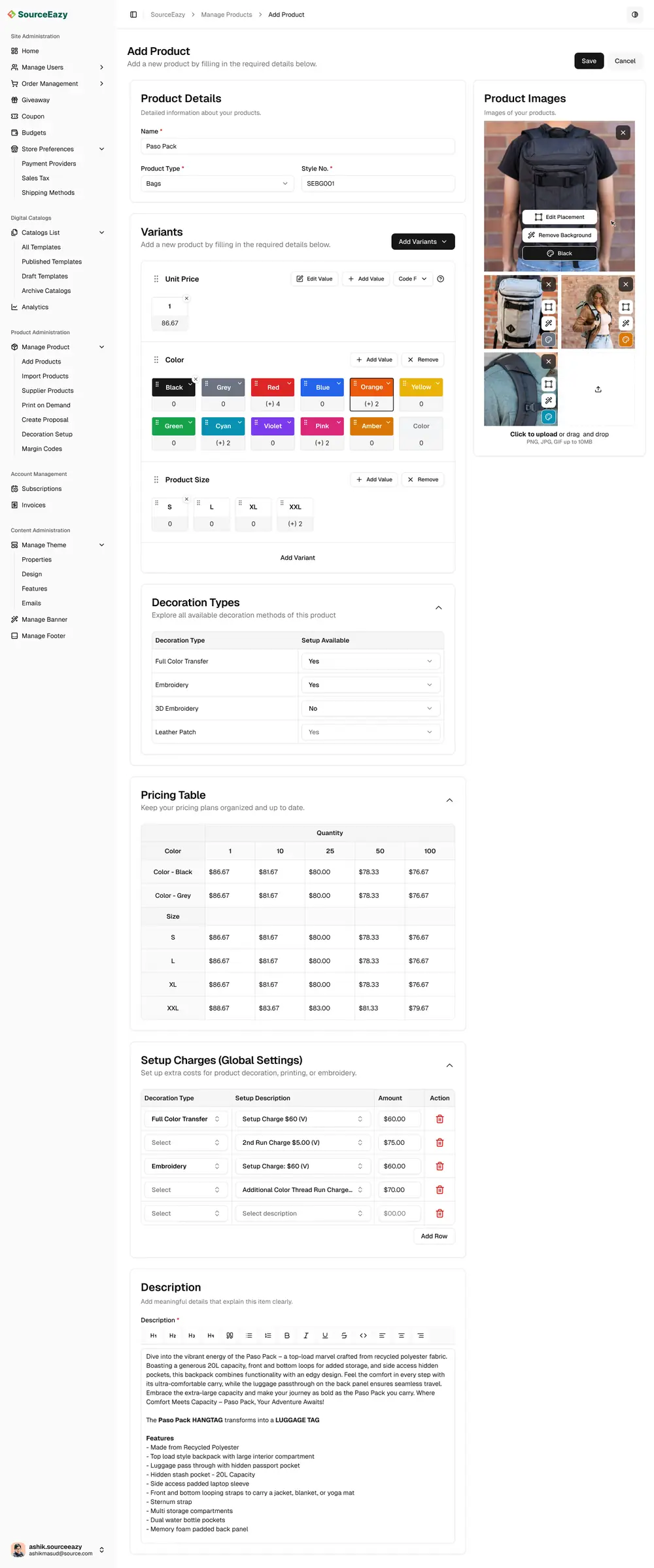
Add Products. Variants, decoration types, quantity-break pricing, setup charges and description in one long form.
Subscriptions. The current plan, billing status, renewal date, invoices and tax.
Profile Settings. Personal info, business profile, addresses, security, payouts, verification and preferences.
Content Administration (Manage Theme, Banner and Footer) controls each customer’s storefront.
03.Design system
Thirty-five pages, one page pattern.
With this many modules, consistency is the feature. Almost every list page is built from the same five parts in the same order, so once someone learns Coupons, they already know Rewards, Giveaways, Users and Orders. Select a part.
CouponsThis page lets you create, update, and manage coupons easily.
Invite UsersAdd Coupon
Total Coupon125Active Coupon2Expired Coupon123
Search⊕ Status⊕ AmountView
NameAmountDescriptionExpire DateStatus
SOURCE2525%Flat 25% discount for Victory DaySep 9, 2025Active
SOURCE3535%35% discount for Summer EventMar 30, 2025Active
Eazy5050%50% discount for Xmas 2024Jun 22, 2025Expired
SORCEXmax6060%50% discount for Thirty First 2024Oct 10, 2025Expired
1 of 100 row(s) selected.Rows per page 10 Page 1 of 10 ‹›
One status language
Status appears on almost every page, so every module uses the same small outlined badges, coloured by meaning rather than by module.
Active
Paid
Uploaded
Pending
Processing
Partially Update
Invited
Bank Processing
Expired
Failed
Error
Suspended
Refunded
04.Dashboard home
The whole businesson one scroll
Numbers, then trends, then people
Home reads top to bottom like a morning check-in. Four headline numbers come first, each against last month: Total Revenue $2,131.86 (+20%), Sales $9,896.66 (+19%), Total Orders 12,012 (+201) and New Orders 400 (+10%).
Below them: Total Sale and Revenue trends, Login Activity Statistics, Best Selling Products (T-shirts lead with 31%) and Total Orders. Then the live tables: Orders List, Recent Buyer Activity, Recent Supplier Activity, Buyer Count Per Store and Store Analytics with storyboard counts.
05.Orders
From the overviewto the artwork file
Orders are where money and production meet, so the module zooms in four levels, each one click deeper, without losing context.
1
Overview
Total orders 12,012, new orders 400, this week $2,131.86 and this month $9,896.66, with order, sales and revenue trends and best sellers above the list.
2
Orders list
Order ID, customer email, amount, source (TechStars, Swag365, SourceEazy…), dates and payment status, with Export and Create New Order.
3
Order details
Order #XP-V6BA5: bill-to and ship-to, job name, customer PO, sales person, source, follow-up and in-hand dates, payment and delivery status. Tabs for Operations, Accounting and Activity Log. Line items show margin, and totals end with profit: $2,401.00 at 24.33%.
4
Product and artwork
One click on a line item opens the product: style ID, size, colour, quantity and price, a mock-up in every colour, and each artwork with decoration type, position, PMS colour and size, ready to download for production.
06.Products & decoration
The engine behindDesign Studio and ProofEazy
Every customizable product on a storefront, every proof and every catalog page starts here. This is the most complex part of the dashboard, so I split it into a gallery, a long but calm form, and two focused editors.
Product gallery
“Organize and maintain your product visuals in one place.” Cards show price, MOQ, type and client, with Upload Brand Logo, Create and Add To Store at the top.
Add product
One product, five collapsible sections: details and images, variants (colours and sizes, each with its own price adjustment), decoration types, a quantity-break pricing table, setup charges and a rich-text description.
Try the pricing table
Color · Black$80.00
Size · XXL$83.00
Unit price drops at 10, 25, 50 and 100 pieces, as in the design.
Edit Placement: draw decoration areas, then set image, appearance, transformation, text, decoration types and masks.
Placement Settings: place a logo, keep it budget friendly with “Make one color”, or turn on AI Enhancement.
07.Users & imports
Bringing whole teams inwithout the mess
Manage Users: totals, roles and statuses.
Import Users: every upload and its result.
Mapping, with problems up front
Step 3 of an import shows the real file (“ASI Chicago Russel 2025.xls”, 13 columns, 264 rows) with a field picker above every column. Matched columns get a green tick; unmatched ones a red underline.
Errors are counted where they happen (“45 invalid cells” with a FIX link under Last Name) and summed at the bottom: “You need to match 33 fields and fix 41 invalid cells”. Continue Import stays disabled until they’re resolved.
08.Giveaways & rewards
Three tools,one familiar page
Giveaways, coupons and budgets solve different problems, but they share the list-page pattern, so each is learnt in seconds. Only the numbers and the actions change.
Giveaway650 giveaways, 450 orders, 52 active, 1,868 units. Every giveaway has a Copy URL to share and a Details view.
Budgets / Rewards125 rewards for all employees, a group or one person, with reward value, issue and expiry dates.
09.Digital catalogs
Publish a catalog,then see what it does
Published templates
Catalogs are cards, because people recognise them by their cover. Each shows client, serial number, product type, status and language (English, French, German, Italian), with filters for status, type, language and date.
Catalog analytics
“Bundle Up & Brand in Style” (CAT-EUUJD) in numbers: 1,205 opens, 7,405 clicks, 56 products, 675 downloads, 79 comments, 78 links and 564 shares, each against last month, with charts and an exportable report.
What the customer sees
The dashboard’s output is a branded, shoppable page. Here, a proposal for Techstars New York: their products with Buy and Add, contact details, their own footer, and a quiet “Powered by SourceEazy”.
10.Account
Billing and settings,without surprises
Subscriptions: plan, next invoice, invoices, and a clear “No tax rate applied” empty state.
Profile Settings: fourteen settings pages grouped into five sections.
11.Visual language
Quiet greys for the work, colour only where it means something.
The dashboard is used all day, so the interface steps back: white surfaces, hairline borders, black primary buttons. Colour is reserved for status and for charts, where orange and teal carry sales and revenue.
Ink#0A0A0A
Surface#FAFAFA
Hairline#E5E5E5
Success#16A34A
Danger#DC2626
Chart orange#EA580C
SourceEazy Dashboard, one back office for every product.