Healthy habits, made playful for kids in Dubai
FitLab is a wellness app for Dubai kids, promoting fitness, nutrition, and mental health through fun, interactive activities.
View on Behance01.Overview
FitLabA health and wellness app for children in Dubai
FitLab is a health and wellness app for children in Dubai, promoting fitness, nutrition, and mental well-being through fun, interactive, and culturally tailored activities.
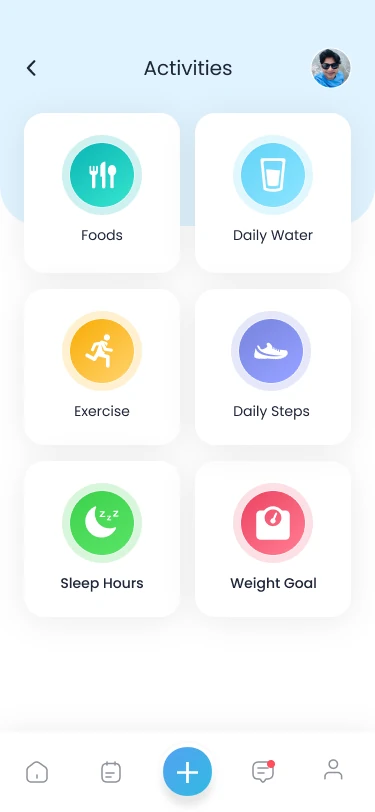
The app turns six everyday habits into small, colourful trackers a child can read at a glance: what they eat, how much water they drink, how they move, how far they walk, how long they sleep, and a weight goal.
- FoodsMeals and macros
- Daily WaterGlasses against a goal
- ExerciseMinutes of play
- Daily StepsSteps to target
- Sleep HoursHours each night
- Weight GoalProgress to a goal
02.Design process
How the work moved
- Step 1ResearchEight apps reviewed
- Step 2UX designOne feature summary
- Step 3User flowHome to every habit
- Step 4WireframeStructure in grey
- Step 5Style guide& UI elements
03.Research
Eight apps, one feature list
Before drawing a screen, I studied health, diet and kids’ fitness apps, noted what each one did well, and merged the findings into a single feature summary for FitLab. Select an app to see what it added.
Feature summary
All eight apps
- Diet plan
- Personal data
- Nutrition tracks and data
- Add food items and calorie calculation
- Eaten items, burned kcal, and protein, carbs and fat by date
- Meal management
- Calorie and macros tracker
- Daily activities data
- Walk target
- Steps, active time, food and sleep tracking
- Steps tracker and workouts
- Daily water target
- Report data
- Weekly weight loss status
- Monthly nutrition data
- Weight loss tracking
- Sync with fitness apps
- Fitness competition with friends
- Rewards
- Chatbot
Noted from Wello
- Rewards
Noted from Lifesum
- Nutrition tracks and data
- Add food items and calorie calculation
- Eaten items, burned kcal, and protein, carbs and fat by date
Noted from Unnamed diet app
- Steps tracker and workouts
- Calorie and macros tracker
- Weekly weight loss status
- Monthly nutrition data
Noted from Kurbo by WW
- Easy food tracking
- Chatbot
Noted from Lose It!
- Calorie tracker and counter
- Weight loss tracking
- Sync with fitness apps
Noted from Kid’s Health & Nutrition
- Diet plan
Noted from Kids Fitness
- Personal data
- Daily workout, walk target and meal management
- Daily water target
Noted from Samsung Health
- Steps, active time, food and sleep tracking
- Fitness competition with friends
04.User flow
Every habit starts from Home
To design the best experience, I explore the various paths a user might take throughout their journey and analyze each step. I typically use Figma to create a detailed user flow map for better clarity and insight.
05.Wireframes
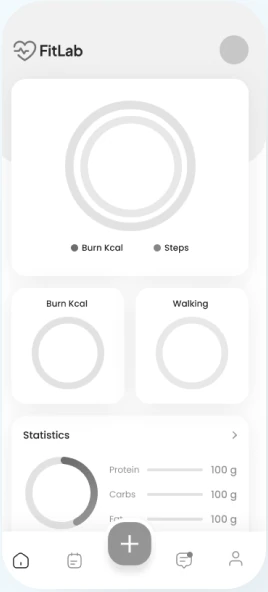
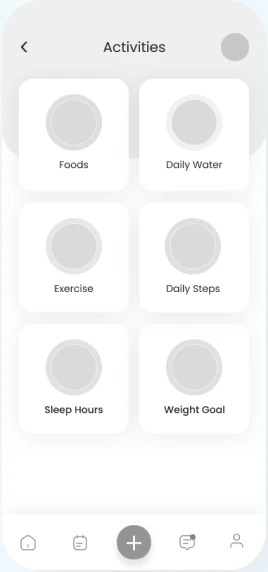
Structure first, colour later
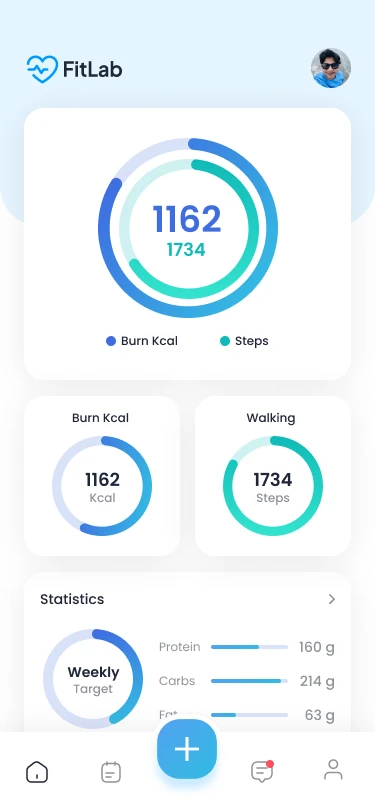
Using insights from the UX research phase, I began creating wireframes focused on organizing screen elements effectively and building a clear, user-friendly app structure.
Drag across a screen to compare the wireframe with the final design.
06.Style guide
Bright, eye-pleasing, and readable on every phone.
I wanted to choose a bright and eye-pleasing colour palette and a readable font, as the application will be used on all phone sizes.
Primary and accent colours
- Primary blue
#0099FF - Accent pink
#F05E78 - Accent amber
#FAB213 - Accent green
#41D450
Secondary colours
- Soft grey
#BEBEBE - Navy ink
#1F2638
Typeface
Poppins- Regular
- Medium
- Semi Bold
One colour per habit
The accents do a job: each habit owns one colour, used for its header, icon, rings, date chip and add button. A child learns that green means sleep and blue means water without reading a word.
- Foods
#23D0C4 - Daily Water
#6FD9FA - Exercise
#FCBE36 - Daily Steps
#8A96F4 - Sleep Hours
#4CDB5A - Weight Goal
#F8637E
07.Screen preview
The most important screens, one by one
Onboarding
When a user opens the app for the first time, we introduce the benefits and features that they can use in the application.
Sign up asks only for the basics: name, email, gender, birthday, weight and height. Activity and weight goals can be skipped for now and set later.
Home & new user page
Home opens on today’s two numbers, calories burned and steps walked, as nested rings, with a weekly statistics card for protein, carbs and fat below.
A new user’s profile holds their details in one place, and the Activities hub puts all six habits one tap away from the central add button.
08.Habit trackers
Six habits, one pattern
Every tracker shares the same screen anatomy, so once a child learns one, they know them all. Only the colour changes.
Foods
Log breakfast, lunch, dinner and snacks, then see the day’s protein, carbs and fat.
- Meals
- Breakfast, lunch, dinner, snacks
- Protein
- 160 g
- Carbs
- 214 g
- Fat
- 63 g
Values as shown in the design.
Daily Water
Every glass fills one more cup on screen, so a child can see how close they are to today’s goal.
- Today
- 50 of 100 fl oz
- Logged
- 3 glasses
- Target
- 50%
Values as shown in the design.
Exercise
Pick an activity, add the minutes, and see how the day’s movement adds up.
- Activities
- Gym, jogging, cardio, cycling, swimming
- Gym
- 60 min
- Cycling
- 40 min
- Playing
- 90 min
Values as shown in the design.
Daily Steps
Set a steps target and watch the ring fill as the day goes on.
- Today
- 755 of 1,200 steps
- Target
- 67%
- Remaining
- 33%
Values as shown in the design.
Sleep Hours
Add last night’s hours and keep the whole week in view.
- Last night
- 6 hours
- Target
- 67%
- Remaining
- 33%
Values as shown in the design.
Weight Goal
Set a goal weight and see how far there is to go, day by day.
- Now
- 55 kg
- Goal
- 45 kg
- Remaining
- 10 kg
- Target
- 80%
Values as shown in the design.
- HeaderTinted in the habit’s colour, with back and profile.
- Today’s ringProgress toward the goal, with the plain-language total.
- One add actionAdd water, add hours, add a goal: always one button.
- Week stripSwipe through the days; the chosen day fills with colour.
- Day summaryA ring and three bars for the selected day.
09.Other screens
The details around the trackers
Notifications can be marked read or unread and deleted one by one or all at once, and clearing everything asks for confirmation first. Foods are found by search and added with a quantity stepper.
A meal, item by item
Each meal lists what was eaten with its quantity, apple, coffee, cake, bread, and a remove button on every row. “Add more foods” sits right below the list, and the day’s macros update underneath.
All together
Combining all the elements together, the result is a clean, moderately bright application.
FitLab, healthy habits that feel like play.
Full project on BehanceFitLab: Dubai Kids’ Health App
View on BehanceNext project