Your advanced facial image processing solution
Experience the power of cutting-edge technology with BJIT FaceAI, an all-in-one facial image processing solution.
01.Overview
FaceAIEight face capabilities, one product
BJIT FaceAI turns facial identification into a powerful security tool for online services such as banking, healthcare and shopping.
I designed the responsive landing page at desktop, tablet and mobile sizes, the subscription and verification flow behind “Free Trial”, the system pages, and a UI style guide that keeps them consistent.
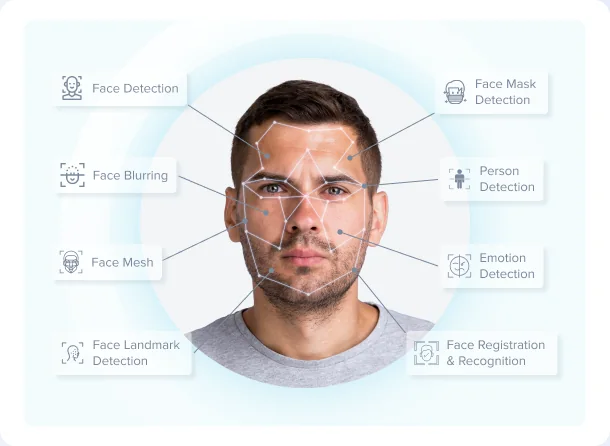
The hero visual
Every capability, mapped to a face
Instead of a list of features, the hero draws lines from points on a real face to each capability, so a visitor understands what FaceAI does in one look.
- Face Detection
- Face Blurring
- Face Mesh
- Face Landmark Detection
- Face Mask Detection
- Person Detection
- Emotion Detection
- Face Registration & Recognition
02.Landing page
From capability to contact
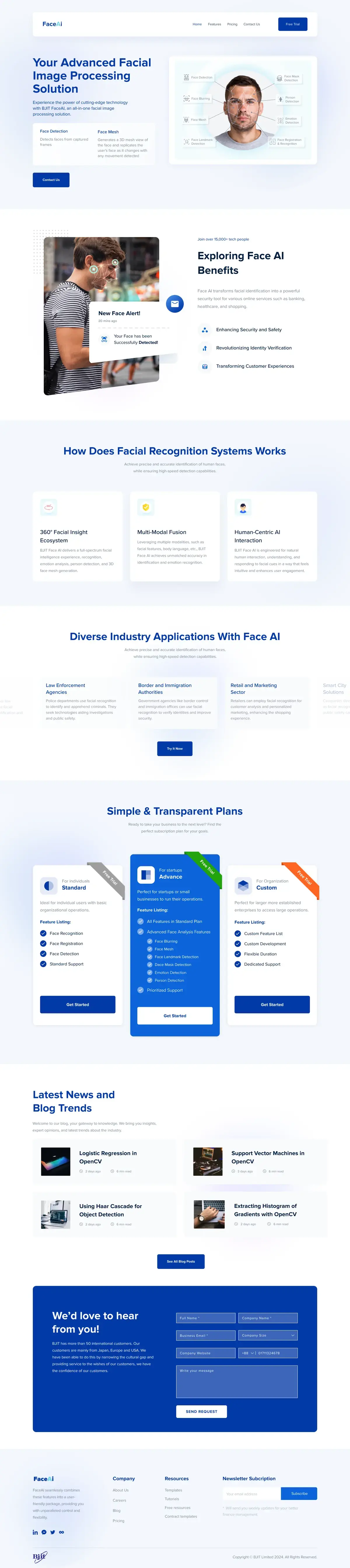
After the hero, each section answers the next question a buyer has: what's the benefit, how does it work, who uses it, and what does it cost.
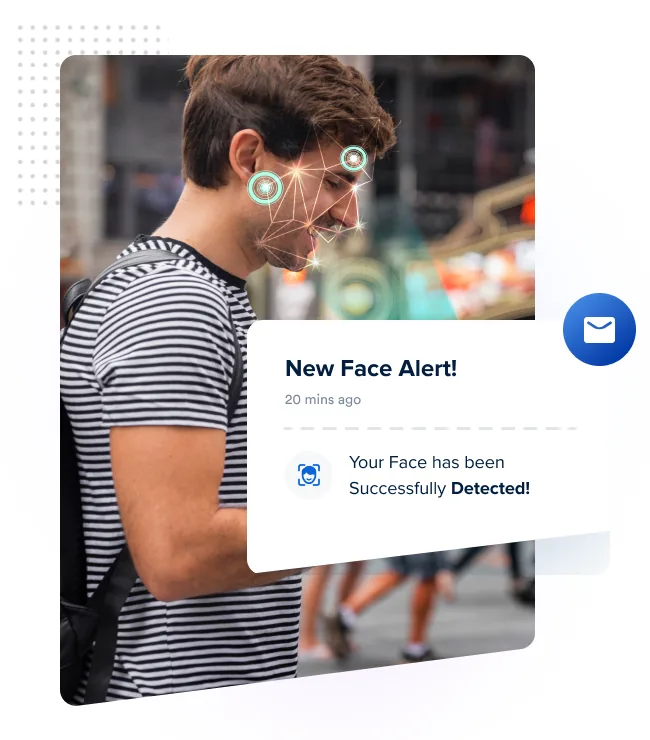
Join over 15,000+ tech people
Exploring Face AI Benefits
Face AI transforms facial identification into a powerful security tool for various online services such as banking, healthcare, and shopping.
- Enhancing Security and Safety
- Revolutionizing Identity Verification
- Transforming Customer Experiences
How Does Facial Recognition Systems Works
Achieve precise and accurate identification of human faces, while ensuring high-speed detection capabilities.

360° Facial Insight Ecosystem
BJIT Face AI delivers a full-spectrum facial intelligence experience, recognition, emotion analysis, person detection, and 3D face mesh generation.

Multi-Modal Fusion
Leveraging multiple modalities, such as facial features, body language, etc., BJIT Face AI achieves unmatched accuracy in identification and emotion recognition.

Human-Centric AI Interaction
BJIT Face AI is engineered for natural human interaction, understanding, and responding to facial cues in a way that feels intuitive and enhances user engagement.
Diverse Industry Applications With Face AI
A sliding carousel of industries, each with a short use case.
Law Enforcement Agencies
Police departments use facial recognition to identify and apprehend criminals. They seek technologies aiding investigations and public safety.
Border and Immigration Authorities
Government agencies like border control and immigration offices can use facial recognition to verify identities and improve security.
Retail and Marketing Sector
Retailers can employ facial recognition for customer analysis and personalized marketing, enhancing the shopping experience.
Try It Now
Simple & Transparent Plans
Ready to take your business to the next level? Find the perfect subscription plan for your goals.
- Free Trial
For individuals
Standard
Ideal for individual users with basic organizational operations.
Feature Listing:
- Face Recognition
- Face Registration
- Face Detection
- Standard Support
- Free Trial
For startups
Advance
Perfect for startups or small businesses to run their operations.
Feature Listing:
- All Features in Standard Plan
- Advanced Face Analysis Features
- Face Blurring
- Face Mesh
- Face Landmark Detection
- Face Mask Detection
- Emotion Detection
- Person Detection
- Prioritized Support
- Free Trial
For Organization
Custom
Perfect for larger more established enterprises to access large operations.
Feature Listing:
- Custom Feature List
- Custom Development
- Flexible Duration
- Dedicated Support
Latest News and Blog Trends
Welcome to our blog, your gateway to knowledge. We bring you insights, expert opinions, and latest trends about the industry.
- Logistic Regression in OpenCV
- Support Vector Machines in OpenCV
- Using Haar Cascade for Object Detection
- Extracting Histogram of Gradients with OpenCV
We'd love to hear from you!
BJIT has more than 50 international customers. Our customers are mainly from Japan, Europe and USA. We have been able to do this by narrowing the cultural gap and providing service to the wishes of our customers, we have the confidence of our customers.
Send Request03.Responsive design
1440, 768, 414
Every section was designed at three widths. Grids collapse from three columns to two to one, the hero visual moves above the headline on smaller screens, and the navigation folds into a menu. Scroll each frame to compare.


04.Sign-up flow
From Free Trial to confirmed
“Free Trial” opens a focused flow on a quiet shell: the FaceAI wordmark, “Back To Homepage”, and one card at a time.
- 1Subscription inquiry
- 2Verify email (OTP)
- 3Payment successful
- 4Thank you
05.UI style guidelines
Deep blue, soft light, one system.
The guidelines cover the menu at desktop, tablet and mobile; large and medium buttons in active, hover, focus and disabled states; the billing toggle; the capability icon set; and form error messaging.
- Primary blue
#0339A7 - Bright blue
#0E62DC - Sky accent
#5BC8F0 - Soft background
#EEF2FC - Error
#FF0000
Unparalleled control and flexibility.
Next project